
<p>上传API文件到网站，微信添加PageCookery公共账号即可使用（下面有详细使用教程说明）。本机器人建立初功能比较薄弱，仅有绑定账号，发表状态功能，后续博主会再接再厉增加更多功能的。个人认为此微信公共账号变相地解决了PageCookery的手机客户端的问题。本账号还处于婴儿阶段，并未作过多的测试，欢迎大家反馈。</p>

<p>使用教程：</p>
<p>第一步：下载wechat.php并上传到PageCookery的根目录（请保证文件名为wechat.php）
</p>
<p>wechat.php源代码（请自行保存以下代码并上传至PageCookery根目录）：

```php
<?php 
include"config.php";
function sql_query($sqlcon){
	$con=mysql_connect(DATABASE_HOST,DATABASE_USER,DATABASE_PSSWORD);
	mysql_select_db(DATABASE_DB_NAME);
	mysql_query("SET NAMES 'utf8'");
	$result=mysql_query($sqlcon);
	mysql_close($con);
	return $result;
}
if(!isset($_GET['do'])) $_GET['do'] = '';
switch($_GET['do']){
	case'auth':
		$user=sql_query("SELECT * FROM user WHERE id= '".$_POST['usr']."'");
		$user=mysql_fetch_array($user);
		$pwd=md5($user['username'].$user['password']);
		if($pwd===$_POST['auth']){
			$j = array('code'=&gt;true, 'message'=&gt;'绑定成功，现在你可以发一条消息试试了！');
		}else{
			$j = array('code'=&gt;false, 'message'=&gt;'绑定失败，请输入正确的信息！');
		}
		echo json_encode($j);
	break;
	case 'post':
		$user=sql_query("SELECT * FROM user WHERE id= '".$_POST['usr']."'");
		$user=mysql_fetch_array($user);
		$pwd=md5($user['username'].$user['password']);
		if($pwd===$_POST['auth']){
			$userid=$_POST['usr'];
			$content=$_POST['content'];
			$time=time();
			$res=sql_query("INSERT INTO entry VALUES ('','0','$content','$time','微信','$userid')");
			if($res){
				$j = array('code'=&gt;true, 'message'=&gt;'发送成功！');
			}else{
				$j = array('code'=&gt;false, 'message'=&gt;'发送失败请稍后再试');
			}
		}else{
			$j= array('code'=&gt;false, 'message'=&gt;'您还未绑定网站或者之前的绑定已失效，请重新绑定！');
		}
		echo json_encode($j);
	break;
	case 'postfromgtalk':
		$user=sql_query("SELECT * FROM user WHERE id= '".$_POST['usr']."'");
		$user=mysql_fetch_array($user);
		$pwd=md5($user['username'].$user['password']);
		if($pwd===$_POST['auth']){
			$userid=$_POST['usr'];
			$content=$_POST['content'];
			$time=time();
			$res=sql_query("INSERT INTO entry VALUES ('','0','$content','$time','Gtalk','$userid')");
			if($res){
				$j = array('code'=&gt;true, 'message'=&gt;'发送成功！');
			}else{
				$j = array('code'=&gt;false, 'message'=&gt;'发送失败请稍后再试');
			}
		}else{
			$j= array('code'=&gt;false, 'message'=&gt;'您还未绑定网站或者之前的绑定已失效，请重新绑定！');
		}
		echo json_encode($j);
	break;
	
	case 'signature':	
		echo '&lt;meta charset="utf-8" http-equiv="content-type" content=""&gt;';
		if(!isset($_POST['username'])) {
			echo '&lt;form method="post" action="./wechat.php?do=signature"&gt;&lt;p&gt;用户名：&lt;input type="text" name="username" value="" /&gt;&lt;/p&gt;&lt;p&gt;密&nbsp;&nbsp;码：&lt;input type="password" name="password" value="" /&gt;&lt;/p&gt;&lt;p&gt;&lt;input type="submit" value="确认" /&gt;';
		} else {
			$user=sql_query("SELECT * FROM user WHERE username = '".$_POST['username']."'");
			$user=mysql_fetch_array($user);
			if(md5($_POST['password']) === $user['password']) {
				$sig = $user['id'].md5($user['username'].$user['password']);
				echo '你的识别码是"'.$sig.'"，请发送"-sig '.$sig.'"给PageCookery微信机器人完成绑定！';
			} else {
				echo '用户名或密码错误！';
			}
		}
	break;
	default:
		$j = array('code'=&gt;true, 'message'=&gt;'微信机器人平台搭建成功！');
		echo json_encode($j);
	break;
}
?>
```

</p>
<p>第二步：关注PageCookery微信机器人账号。微信中选择“朋友-添加朋友-查找微信公众账号”，输入pagecookery即可查到机器人账号，添加即可。或者直接扫描下面的二维码即可成功添加。<br/><img src="https://p.upyun.lithub.cc/ww3.sinaimg.cn/small/6505e363gw1e0wl37vvz6j.jpg" alt="PageCookery微信机器人" /></p>
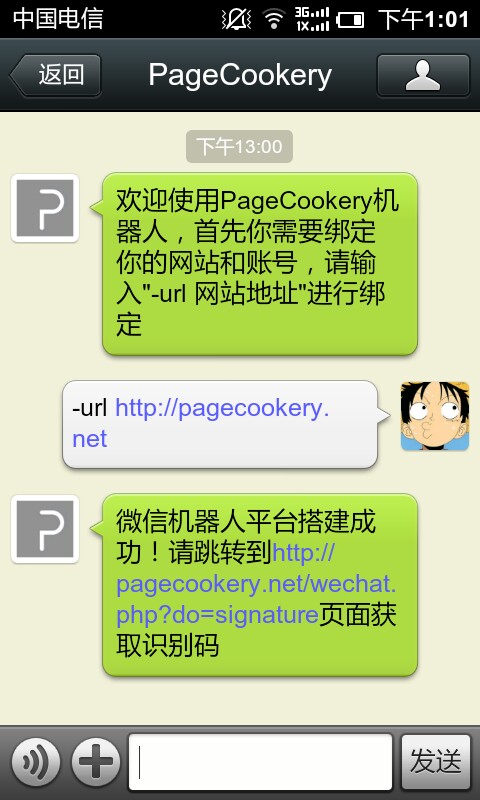
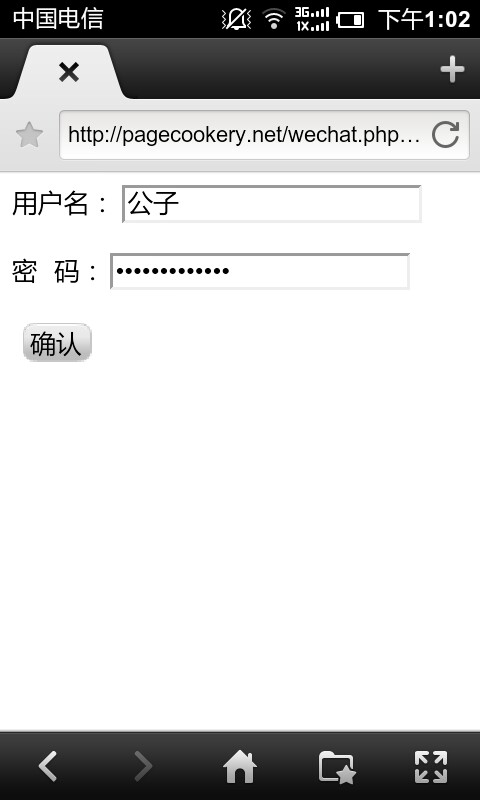
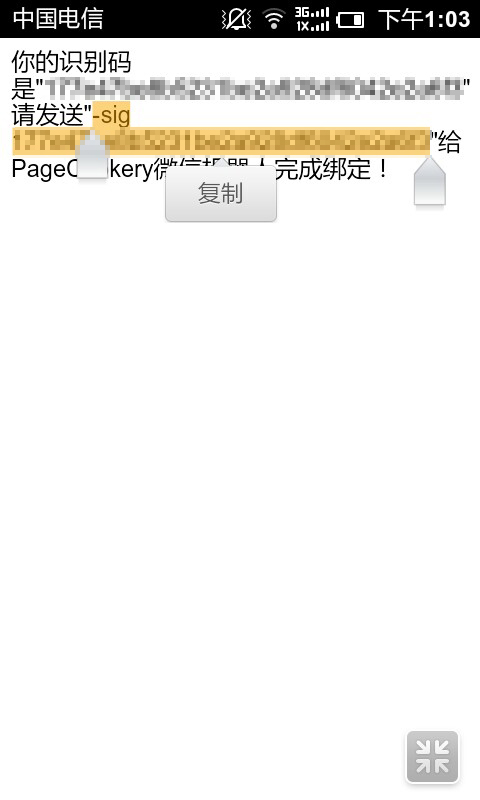
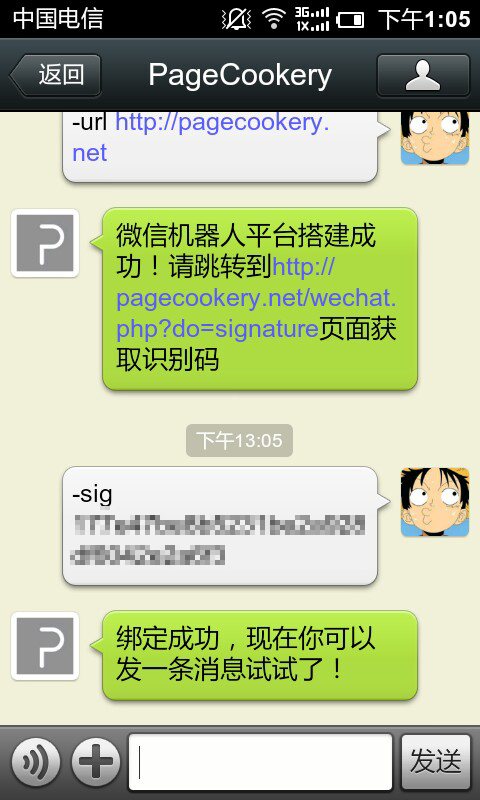
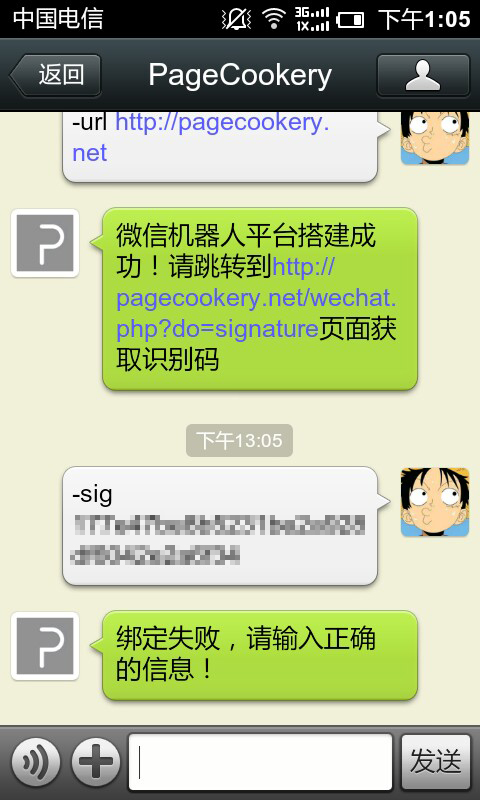
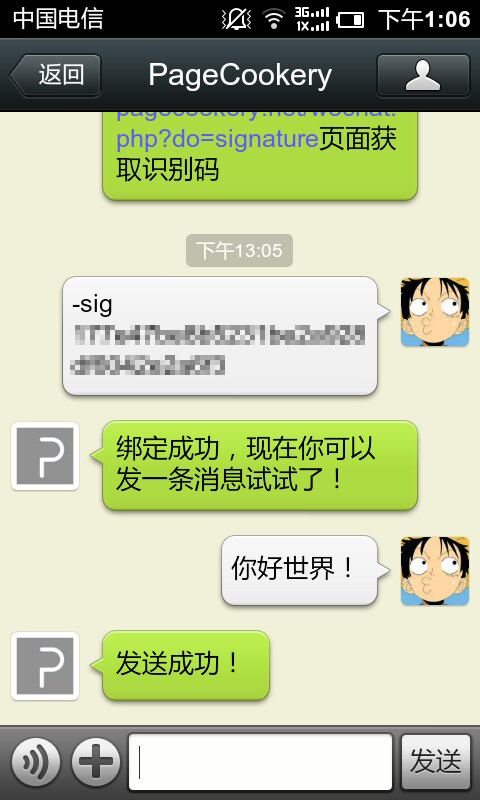
<p>第三步：绑定自己的网站和账号。首先发送消息“-url 你的网站地址”，会让你跳转到另外一个页面，复制地址到浏览器中打开输入你的账号和密码后会返回识别码，复制识别码到微信中发送过去就完成绑定过程了。具体使用见下图：</p>
<p>第一次关注会提示你绑定网站，输入“-url 你的网站地址”即可完成绑定。<br/><a href="https://p.upyun.lithub.cc/imnerd.org/web_needs/20130118_130108.jpg"><img src="https://p.upyun.lithub.cc/imnerd.org/web_needs/20130118_130108.jpg"  width="250px" alt="绑定账号成功" /></a><a href="https://p.upyun.lithub.cc/imnerd.org/web_needs/20130118_130148.jpg"><img src="https://p.upyun.lithub.cc/imnerd.org/web_needs/20130118_130148.jpg" width="250px" alt="绑定账号成功" /></a></p>
<p>复制地址到浏览器中打开，并输入你的PageCookery账号和密码，网页会返回识别码，复制识别码发送给PageCookery微信机器人即可完成绑定。<br/><a href="https://p.upyun.lithub.cc/imnerd.org/web_needs/20130118_130224.jpg"><img src="https://p.upyun.lithub.cc/imnerd.org/web_needs/20130118_130224.jpg" width="250px" alt="绑定账号成功" /></a><a href="https://p.upyun.lithub.cc/imnerd.org/web_needs/20130118_130322.jpg"><img src="https://p.upyun.lithub.cc/imnerd.org/web_needs/20130118_130322.jpg" width="250px" alt="绑定账号成功" /></a><a href="https://p.upyun.lithub.cc/imnerd.org/web_needs/20130118_130519.jpg"><img src="https://p.upyun.lithub.cc/imnerd.org/web_needs/20130118_130519.jpg" width="250px" alt="绑定账号成功" /></a></p>
<p>如果发送错误的识别码过去，机器人会提示绑定失败。<br/><a href="https://p.upyun.lithub.cc/imnerd.org/web_needs/20130118_130542.jpg"><img src="https://p.upyun.lithub.cc/imnerd.org/web_needs/20130118_130542.jpg" width="250px" alt="绑定账号成功" /></a></p>
<p>绑定账号完成后直接输入消息就可以发布状态了。<br/><a href="https://p.upyun.lithub.cc/imnerd.org/web_needs/20130118_130622.jpg"><img src="https://p.upyun.lithub.cc/imnerd.org/web_needs/20130118_130622.jpg" width="250px" alt="发布状态" /></a></p>